At times when creating trading strategies using big data you need access to historical economic data. One of the best sources of data is the Economic Research branch of the St. Louis Federal Reserve or FRED. Today I’m going to show you how to pull that data into a dataframe so that you can analyze it using machine learning or AI.
The first step is to import Pandas datareader. What this piece of code does is it downloads all the data for Corporate AAA bond yields. Every dataset in FRED has a symobl. In this case it’s DAAA.
import pandas_datareader.data as web
import datetime

today = pd.to_datetime("today")
start = datetime.datetime(1900, 1, 1)
end = today

df_Corp_AAA_yield = web.DataReader(['DAAA'], 'fred', start, end)

# not working - Corp_AAA_yield = web.DataReader(['DAAA'], 'fred', start, end)
df_Corp_AAA_yield.head()
df_Corp_AAA_yield.tail()
We can now visualize our dataframe by plotting it.
df_Corp_AAA_yield.plot(grid=True)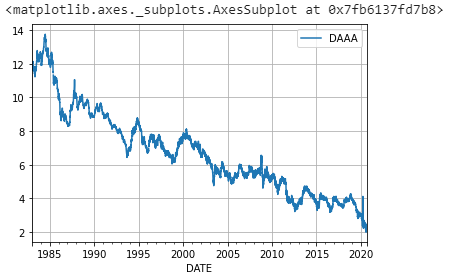
















Leave a Reply
You must be logged in to post a comment.